If you are still relying on traditional image pixels, JavaScript tags, or browser cookies to track conversions, your affiliate program is leaking money. In 2026, browser privacy standards like Apple’s Intelligent Tracking Prevention (ITP) and Google's privacy sandbox are actively blocking client-side cookies. The industry-standard solution is Postback Tracking (also known as Server-to-Server or S2S tracking).
But while every marketing blog recommends S2S tracking, very few explain how it actually works under the hood. In this guide, we will break down the mechanics of postback tracking, walk through the technical data transfers, and explain why it is the most secure tracking mechanism available today.
Quick Answer: What is a Postback URL?
A Postback URL is a specific API endpoint hosted by your tracking platform (e.g., https://api.afftrax.com/postback) that receives conversion notifications directly from an advertiser's server. Instead of a browser pixel firing when a user completes a purchase, the advertiser's backend database fires an HTTP request containing a unique Transaction ID to your postback URL to record the conversion.
Why Postback Tracking Exists
To understand postback tracking, we must first look at the failures of browser-based cookie tracking. When a visitor clicks an affiliate link, legacy platforms write a small cookie file to the user's browser. If that user buys something later, a tracking pixel on the checkout page reads the cookie and logs the affiliate split.
This method breaks down under three common modern scenarios:
- Cookie Blockades: Privacy blockers, Safari ITP, and Brave browser block third-party tracking scripts by default.
- Adblockers: Millions of media buyers run extensions (like uBlock Origin) that intercept and block tracking domain script downloads.
- Cross-Device Conversion: If a user clicks an link on their mobile phone but checks out later on their desktop, the cookies cannot bridge the gap.
Postback tracking bypasses the browser entirely. Once a click is recorded, the attribution is managed directly through database-to-database communication.
How Postback Tracking Works: The Step-by-Step Flow
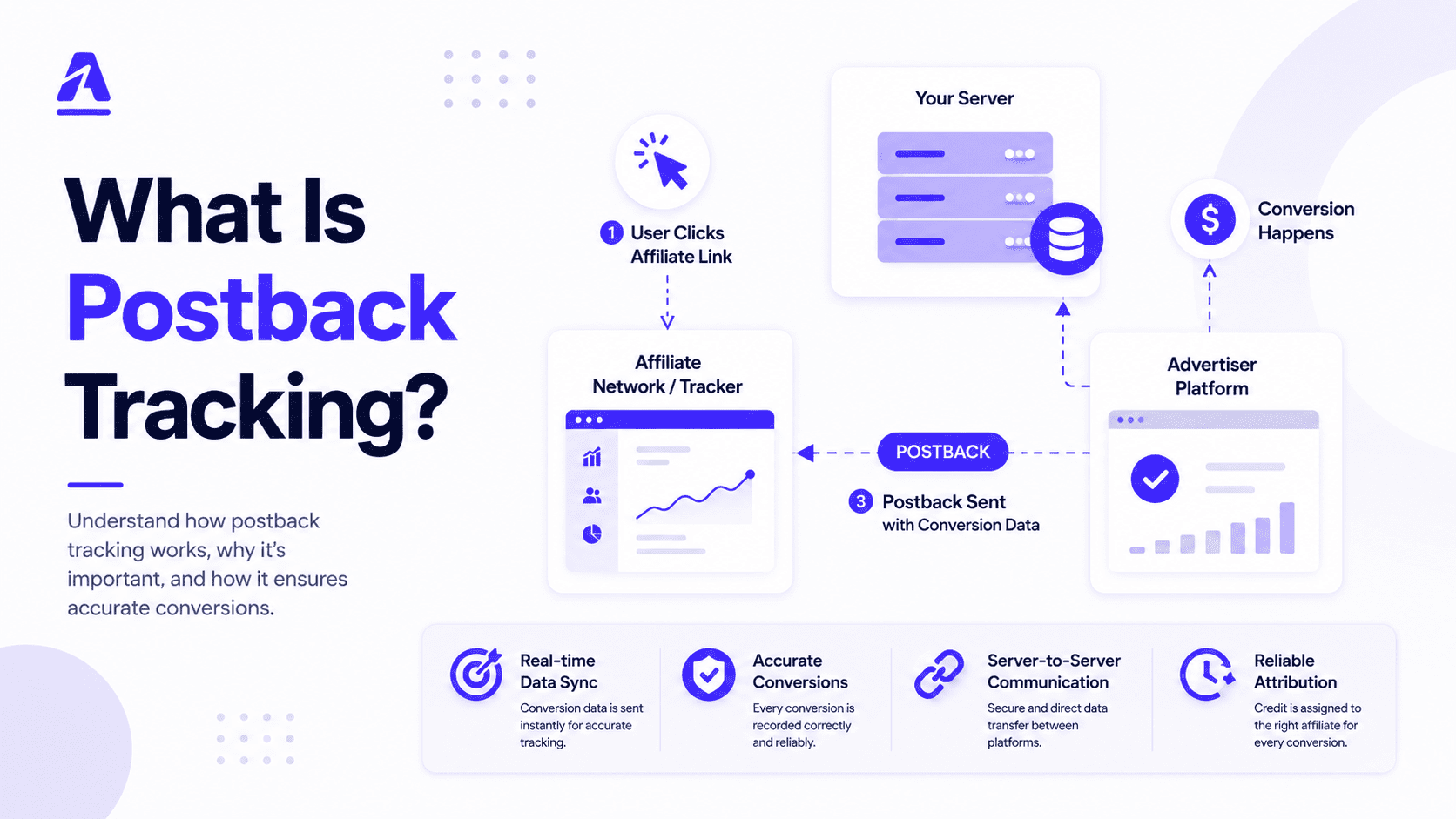
Postback tracking relies on passing a unique variable—known as a Click ID (or Transaction ID)—throughout the entire conversion cycle. Here is the ASCII flow diagram mapping the data loop:
[1. User Click]
      │
      ▼
[AffTrax Edge Node] ──────(Generates Click ID: "TX_99812")
      │
      ▼  (Redirects User to Advertiser Landing Page)
[Advertiser Store] ───────(Captures & Stores Click ID in Session Database)
      │
      ▼  (User Completes Purchase / Action)
[Advertiser Server] ──────(Fires Postback URL containing Click ID)
      │
      ▼  (Direct API HTTP Request)
[AffTrax Server] ────────(Matches "TX_99812", credits partner, automates split)
Step 1: The Click Generation
When a visitor clicks a partner's link, they hit your tracking subdomain. Your software (such as AffTrax) immediately generates a unique, cryptographic Click ID (e.g., click_id=TX_99812) and routes the user to the advertiser’s landing page. The redirect URL includes this parameter:
https://www.advertisershop.com/landing?subid=TX_99812
Step 2: Storing the Click ID
The advertiser's server captures the incoming subid query parameter and saves it inside the user's session database or shopping cart state. The browser cookie is no longer responsible for storing this ID.
Step 3: Firing the Postback Callback
When the user completes the conversion (e.g., submits a lead form or checks out), the advertiser's backend database checks the user's profile, retrieves the stored Click ID (TX_99812), and automatically fires an outbound HTTP GET/POST request to your postback endpoint:
https://api.afftrax.com/postback?click_id=TX_99812&payout=15.00
Step 4: Validation & Ledger Update
Your tracking platform receives the callback, checks its database to match the Click ID, verifies the offer terms, credits the correct affiliate partner, and updates the billing ledger in real-time.
Cookie Tracking vs. Postback Tracking
Let's compare the characteristics of both tracking standards side-by-side:
| Feature | Cookie / Pixel Tracking | Postback (S2S) Tracking |
|---|---|---|
| Data Storage Location | User's local browser memory | Advertiser & Tracker secure servers |
| Vulnerability to Adblockers | Very High (Scripts easily blocked) | Zero (Bypasses browser completely) |
| Safari ITP Restrictions | Blocked or capped to 24 hours | Immune (Server callbacks are unaffected) |
| Cross-Device Accuracy | Very Low | High (Attributed via database session) |
| Technical Setup Difficulty | Easy (Add a copy-paste JS script) | Moderate (Requires URL parameter handling) |
Common Postback Tracking Mistakes & How to Avoid Them
1. Parameter Name Mismatches
The single most common setup issue is parameter confusion. If your tracking platform is sending the Click ID variable as {click_id}, but the advertiser's server is listening for {clickid} or {subid}, the ID won't get captured. Always double-check and map your variable tokens precisely.
2. Hardcoding Click IDs
Sometimes non-technical advertisers hardcode a static test ID into their postback script (e.g., click_id=TEST_123). When affiliates start driving traffic, all conversions map to that single test ID, causing massive attribution drops. Always ensure the parameter placeholder is set up dynamically.
Troubleshooting Checklist: No Conversions Logged?
If conversions are not showing in your dashboard, copy the postback URL, replace the variable token with a real Click ID from your click log, and paste it directly into your web browser. If the conversion records instantly, the tracking setup is correct, and the advertiser is simply failing to pass the Click ID dynamically from their database.
3. Payout and Currency Discrepancies
If your network is configured in USD ($), but the advertiser's system fires the postback with numerical payouts in EUR (€) or GBP (£) without mapping currency variables, your accounting splits will be inaccurate. Always verify currency parameters or set fixed payout terms in your campaign configurations.
How Affiliate Platforms Like AffTrax Handle Postbacks
Modern affiliate platforms like AffTrax are engineered to handle postback callbacks at scale. Because thousands of conversion notifications can fire concurrently during high-volume campaigns, the postback receiver must be fast. AffTrax processes incoming postback hooks at Go-based edge nodes in under 12ms.
Additionally, AffTrax implements an Automatic Retry Queue. If an advertiser's server fires a postback but your database experiences a temporary drop, the platform keeps the signal safe, retrying the callback validation using exponential backoff over a 72-hour period to guarantee zero loss of conversion data.
Summary & Future Trends
As browser privacy updates continue to lock down browser storage, S2S postback tracking will become the only viable attribution method for performance networks. Upgrading your networks, agency campaigns, and advertiser partnerships to postback standard today protects your margins, secures publisher trust, and future-proofs your brand ecosystem.
Frequently Asked Questions
1. What is a postback URL in affiliate marketing?
A postback URL is a secure API address used by a tracker to receive conversion events directly from an advertiser's server, bypassing browser-side script actions.
2. What is a Click ID?
A Click ID is a unique alphanumeric identifier generated by the tracking platform every time a user clicks a tracking link. It is passed to the advertiser and returned during a postback callback to log a conversion.
3. Why is postback tracking more accurate than pixels?
Because postback calls occur directly between servers, they are immune to browser adblockers, Safari ITP restrictions, incognito modes, and cookie deletion loops.
4. What does S2S stand for?
S2S stands for Server-to-Server. It refers to data transfers happening directly between servers without client browser participation.
5. How do I test a postback URL?
Copy the postback URL from your platform, insert an active Click ID from your click logs into the parameter token, and paste the URL into your browser address bar. The platform should immediately log a successful conversion.
6. Do I need SSL / HTTPS for postbacks?
Yes. In 2026, all postback transactions must run over secure HTTPS protocols to ensure cryptographic validation and data privacy.
7. Can I track multiple payouts on one postback?
Yes. You can pass dynamic parameters (like payout={payout_amount}&transaction_id={order_id}) to update billing ledgers for variable e-commerce purchases.
8. What is a conversion lag time?
It is the duration between the initial click timestamp and the conversion callback timestamp. Lag times under one second are commonly flagged as invalid fraud patterns.
9. Does postback tracking work on mobile apps?
Yes. Mobile apps store Click IDs using internal device states or mobile SDK hooks, firing postbacks via API webhooks when in-app conversion milestones are reached.
10. What is a fallback redirect domain?
It is a secondary domain used to route click traffic if your primary tracking domain experiences hosting or DNS drops, protecting campaign continuity.
11. How do I prevent double conversions on a single click?
Configure your tracking settings to reject duplicate Click ID registrations. Once a Click ID is logged as converted, subsequent postbacks using the same ID are voided.
12. What are postback tokens?
Tokens (or placeholders) are variables like {click_id} or {payout} used in tracking templates. The advertiser replaces these tokens with real transaction values when firing the postback URL.
13. Can we run postbacks with CRM platforms like Salesforce?
Yes. By binding webhook endpoints, CRM platform updates (such as changing a status to 'Closed Won') can trigger postback calls back to your affiliate tracker.
14. What is the difference between global and offer-specific postbacks?
A global postback tracks conversions across all offers in your account using a unified template, while an offer-specific postback tracks variables customized for a single campaign.
15. How long does a postback tracking setup take?
With modern affiliate tracking tools like AffTrax, setting up campaign postbacks only takes a few minutes by matching the advertiser's parameters to your platform's tokens.