In the digital acquisition landscape, performance marketing stands out as the ultimate ROI-driven model: businesses pay only for verified customer actions, and publishers are rewarded purely for performance. But beneath the slick dashboard panels and high-converting marketing campaigns lies a highly sophisticated tracking infrastructure. For founders, media buyers, and software engineering teams running performance campaigns, understanding the exact mechanics of this infrastructure is essential to prevent attribution loss, combat advertising fraud, and secure profit margins.
This technical guide will strip away the high-level marketing terminology and explore the underlying network protocols, database parameters, cookie behaviors, redirect structures, and database-to-database postback signals that make affiliate attribution possible.
Quick Answer Featured Snippet
How does affiliate tracking work under the hood? Affiliate tracking maps a conversion back to a specific publisher by binding a unique click token to a user session. When a user clicks a tracking link, the click is routed through an Affiliate Tracking Software server. The system generates a unique, cryptographic Click ID (e.g., a Transaction ID), records session attributes (IP, User-Agent, geo) in a database, and redirects the browser to the merchant page. Attribution is resolved using either client-side cookies (which store the Click ID in the user's browser) or server-side postbacks (where the merchant's server tracks the Click ID and calls the tracking platform's API via a secure HTTP GET/POST webhook upon checkout).
What Is Affiliate Tracking?
At its core, affiliate tracking is the secure, real-time logging, mapping, and verification of digital marketing pathways. It is the process of proving that a specific purchase, user sign-up, or lead form completion originated from a specific affiliate publisher's website, email list, or search campaign. Accurate tracking is critical because it directly influences commission payouts, ROI metrics, client billing, and partner trust.
Why Accurate Tracking Matters
In performance marketing, a tracking discrepancy of even 5% can wipe out your net margins. If your tracking platform is slow, users will drop off during redirect hops, causing Click-Through-to-Land (CTL) metrics to plummet. If your system relies on outdated client-side scripts, browser privacy updates (like Apple's Intelligent Tracking Prevention) or ad-blockers will drop tracking tags, resulting in conversions that go unattributed. Legitimate publishers lose their commissions, while advertisers lose visibility into their actual customer acquisition costs (CAC). This is why choosing a robust, edge-optimized tracking architecture is a core business decision.
The Complete Affiliate Tracking Journey
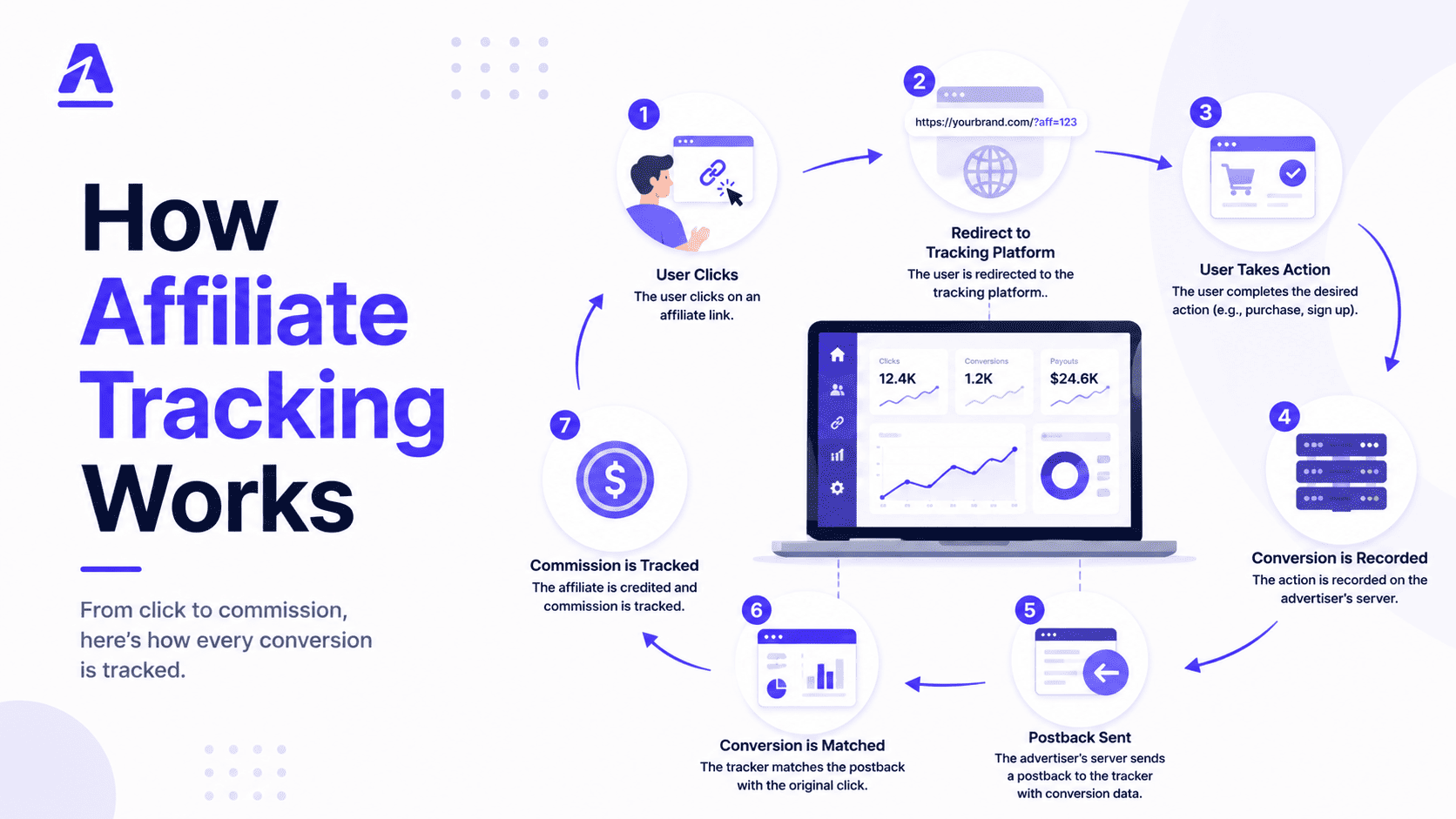
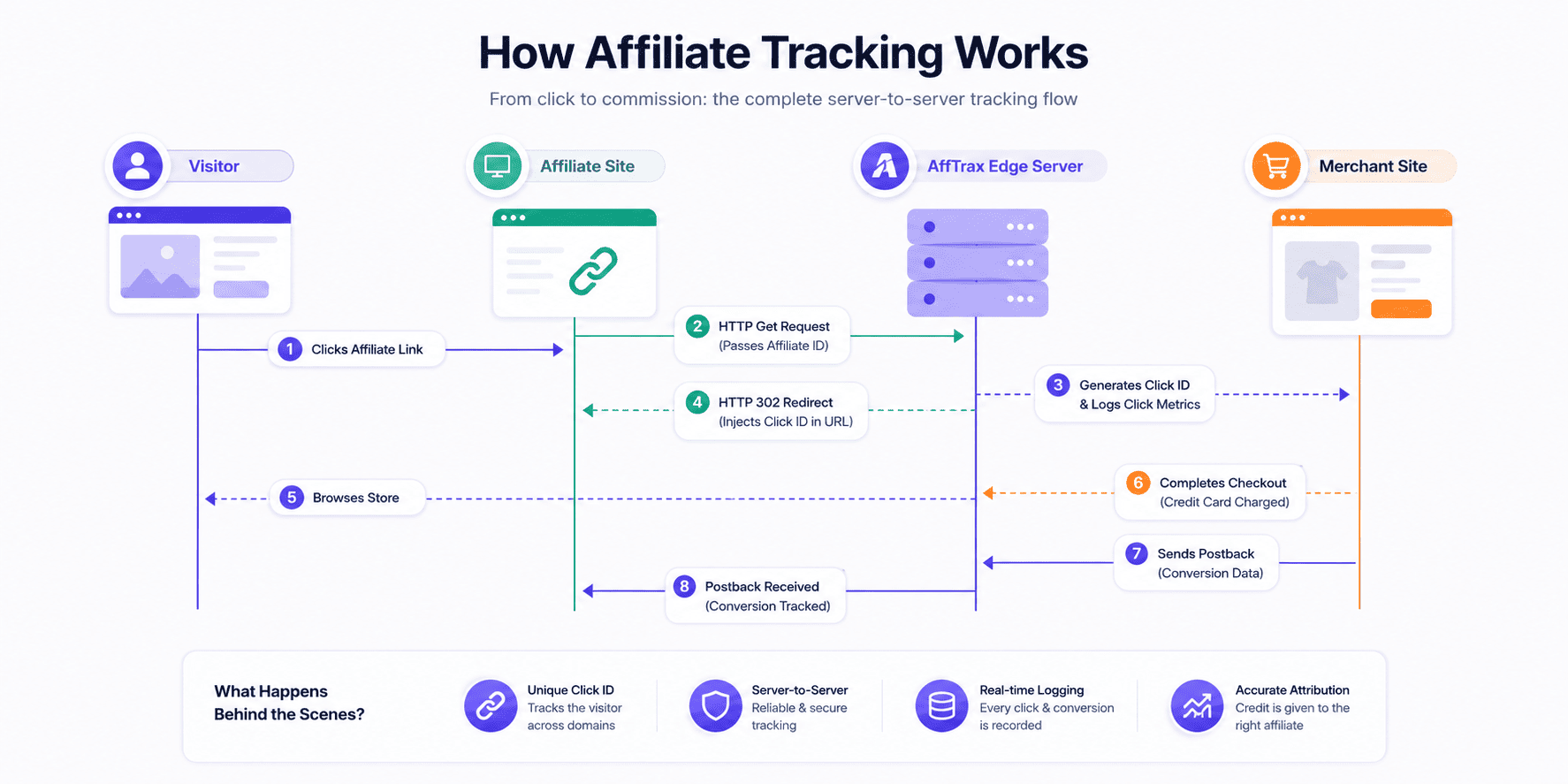
To understand the mechanics of affiliate tracking, it is helpful to look at the process from start to finish. The lifecycle of a tracked transaction spans several technical checkpoints. Below is the server-to-server lifecycle of an affiliate conversion:
How Affiliate Links Work
The entire tracking pipeline starts with a tracking link (also known as an affiliate redirect link). Rather than sending a visitor directly to the advertiser's store domain, a tracking link directs the visitor's browser to the tracking platform's routing gateway first. This routing step usually happens in less than 50 milliseconds, making the hop invisible to the end-user.
CNAME Custom Tracking Domains
Standard tracking links often use generic tracking domains (e.g., networktracker.com/click?aff=12). However, modern setups utilize custom tracking subdomains mapped via DNS CNAME records (e.g., partners.brand.com/click?aff=12). By pointing a custom subdomain to the tracking platform, the tracking requests resolve within a first-party context, preventing ad-blockers and privacy filters from flagging the connection as a third-party tracking domain.
Understanding Tracking Parameters
Tracking links contain structured query parameters in the URL query string. These parameters act as data keys mapping traffic elements to variables in the platform's database. A standard tracking URL structure looks like this:
https://track.afftrax.com/click?pid=48&offer_id=102&sub1=adwords&sub2=us_news
Let's dissect the components of this query string:
- pid (Publisher ID): The unique identifier of the affiliate partner who referred the visitor.
- offer_id (Campaign ID): The ID of the advertiser's product campaign.
- sub1 to sub5 (Sub-IDs / Custom Parameters): Flexible variables passed by the publisher to track dynamic criteria such as traffic source, keyword, creative layout, ad placement group, or device type.
What Happens When a User Clicks an Affiliate Link
When a user clicks a tracking link, a fast sequence of network requests takes place:
1. Click Tracking & Event Logging
The tracking server intercepts the incoming HTTP GET request. The system parses the URL parameters, captures the visitor's IP address, parses the HTTP User-Agent header to determine the browser and OS, reads the geolocation, and performs a series of security checks. In high-performance systems like AffTrax, these validations are completed in under 15 milliseconds at edge nodes to prevent traffic lag.
2. Redirect Tracking Protocols
After recording the click metrics, the tracking server issues an HTTP redirection status response to the user's browser, routing them to the advertiser's landing page. There are two primary redirection protocols used:
- HTTP 302 Redirect: A temporary redirect indicating the resource has moved temporarily. It is the most common standard, allowing the tracking gateway to preserve HTTP headers and referrers.
- HTTP 307 Redirect: A strict temporary redirect ensuring the browser does not change the request method from POST to GET, useful for secure transactions.
- Client-Side Meta-Refresh: An HTML-based redirect that loads a blank page and uses a script or meta tag to route the browser. This method is slow and drops the HTTP referrer, making it less desirable for performance networks unless they explicitly want to clear the referrer URL for privacy.
Cookie-Based Tracking
Once the visitor lands on the merchant's site, the merchant's site needs a way to store the attribution data while the user browses the product catalogue. Historically, this has been achieved using cookies.
How Cookies Store Attribution Data
When the user lands on the advertiser's site, a client-side tracking script (like a Javascript pixel) parses the tracking parameters from the landing URL and sets a cookie in the user's browser. This cookie contains the publisher's ID or the click token. When the user eventually makes a purchase, the checkout page's conversion pixel reads the cookie file, retrieves the stored publisher ID, and sends a conversion request back to the White Label Affiliate Software network database to credit the partner.
First-Party vs Third-Party Cookies
The type of cookie used has massive implications for tracking reliability:
- Third-Party Cookies: Set by a domain other than the one the user is currently visiting (e.g., the tracking platform's domain). Because third-party cookies allow cross-site tracking, modern browsers like Apple Safari, Mozilla Firefox, and Google Chrome block them by default. Relying on third-party cookies for performance marketing is no longer viable.
- First-Party Cookies: Set directly by the domain the user is visiting (e.g., the merchant's store). These cookies are generally allowed because they are necessary for site functionality (like shopping carts). However, browser privacy policies (like Safari's ITP) limit the lifespan of first-party cookies set via Javascript to 1 to 7 days, meaning conversions that happen after a week will go untracked.
Server-to-Server (S2S) Tracking Explained
To overcome the limitations of browser cookies, the performance marketing industry has moved towards Server-to-Server (S2S) tracking, commonly referred to as Postback Tracking. S2S tracking bypasses the browser entirely during the conversion verification step, linking databases directly.
How Postback Tracking Works
Rather than using a browser cookie, postback tracking relies on a unique, database-backed tracking token called a Click ID.
Here is the step-by-step technical lifecycle of S2S postback tracking:
- Click ID Generation: When a user clicks an affiliate link, the tracking server generates a unique, alphanumeric string (e.g.,
tx_9a8f7b6c5d4e) and records it in its database alongside the publisher ID, campaign parameters, and click metrics. - Passing the Click ID: The tracking server appends this Click ID to the merchant's landing page URL as a query parameter (e.g.,
https://merchant.com/page?aff_click_id=tx_9a8f7b6c5d4e). - Capturing the Click ID: The merchant's site captures this Click ID from the URL and stores it in their backend session or database (not just a browser cookie).
- Firing the Postback Webhook: When the user purchases the product, the merchant's backend database logs the conversion and retrieves the stored Click ID. The merchant's server then triggers an outbound HTTP request (a postback webhook) to the tracking platform's endpoint, passing the Click ID:
https://track.afftrax.com/postback?click_id=tx_9a8f7b6c5d4e&amount=99.00 - Resolving Attribution: The tracking platform receives the postback request, queries its database for the matching Click ID, validates the transaction signature, and awards the commission to the correct partner in real-time.
Technical Comparison: Cookie-Based vs. Server-to-Server Tracking
| Vector | Cookie-Based (Client-Side) | Postback Tracking (Server-Side) |
|---|---|---|
| Attribution Medium | Browser Cookie file (stored locally) | Database click tokens (Click ID) |
| Ad-Blocker Vulnerability | High (scripts can be blocked easily) | Immune (bypasses browser engine) |
| Browser Uptime Limit | 1 to 7 days cap (ITP/ATT blocks) | Unlimited (determined by network data retention) |
| Setup Difficulty | Low (copy-paste HTML script block) | Medium (requires dynamic backend query passes) |
| Data Payload Payload | Limited browser headers only | Rich payloads (product names, status hooks, CRM links) |
How Conversion Attribution Works
When multiple partners are involved in a customer's path to purchase, a tracking engine must apply specific logic to distribute credit. This logic is defined by Attribution Models. An Partner Management Software platform supports several standard models:
1. Last Click Attribution
This model awards 100% of the conversion credit to the publisher who drove the final click before the purchase occurred. It is the legacy industry standard, as it reflects the immediate trigger of the transaction, though it overlooks earlier research touchpoints.
2. First Click Attribution
This model awards 100% of the conversion credit to the partner who drove the very first click, introducing the brand to the user. It is rarely used for affiliate commissions, but remains useful for understanding top-of-funnel customer discovery pathways.
3. Multi-Touch Attribution
Multi-touch models distribute credit across multiple click events (e.g. linear share, time-decay, or position-based splits). For example, 40% of the commission goes to the first click (discovery), 40% to the last click (conversion), and 20% is distributed to intermediate coupon or review blogs.
Attribution Models Compared
| Model | Credit Distribution | Primary Use Case | Pros & Cons |
|---|---|---|---|
| Last Click | 100% to the last touchpoint | CPA Networks & E-commerce | Simple to track, but undervalues content bloggers. |
| First Click | 100% to the initial touchpoint | Top-of-funnel content campaigns | Rewards discovery, but ignores close-to-sale efforts. |
| Multi-Touch (Positional) | Shared (e.g. 40/20/40 split) | Complex enterprise B2B SaaS routes | Accurately tracks customer journeys, but technically complex to deploy. |
How CPA Networks Track Conversions
CPA networks act as intermediaries connecting hundreds of advertisers with thousands of affiliate publishers. In a CPA network setup, the tracking must scale to handle double-hop routing loops. When a click occurs:
- The visitor clicks the publisher's link, which hits the CPA Network Software tracking gateway.
- The network generates a unique Click ID, records the transaction, and redirects the visitor's browser to the advertiser's tracking URL.
- The advertiser generates their own internal Click ID, links it to the network's Click ID, and sends the user to the landing page.
- Upon purchase, the advertiser's server fires a postback callback to the network, passing the network's Click ID. The network then attributes the payout to the publisher.
How Advertisers Validate Conversions
To prevent paying for duplicate or invalid leads, advertisers perform validation routines before settling invoices. Typical validation checks include:
- De-duplication: Checking that the same Click ID or checkout transaction code has not been submitted multiple times.
- Chargeback Reconciliation: Reconciling refund requests and credit card chargebacks against the conversion database to claw back affiliate commissions.
- Anti-Fraud Diagnostics: Utilizing tools like Affiliate Management Software to scan click-to-conversion latency (conversions that happen under 2 seconds are almost always bot-driven).
Common Tracking Challenges
Even with advanced systems, digital tracking faces several operational challenges:
Tracking Loss and Attribution Errors
Attribution loss occurs when conversions are missed entirely. This typically happens when:
- An advertiser's developer updates a landing page template and accidentally removes the tracking parameters script.
- A customer uses an aggressive script-blocker or private browser that wipes session query strings before the backend database can write them.
- An email marketing software masks URLs, removing custom sub-IDs needed to link clicks to campaigns.
Privacy Changes and Tracking
Browsers and operating systems are continuously tightening user privacy policies. Apple's iOS App Tracking Transparency (ATT) framework requires users to explicitly opt-in to track device IDs. Concurrently, major browsers are shortening first-party cookie lifespans and sanitizing tracking parameters directly from URL strings. To adapt, tracking platforms must bypass the browser entirely and deploy CNAME records mapped to clean server endpoints.
The Future of Affiliate Tracking
The future of performance tracking belongs to edge-first computation. By deploying lightweight, compiled code (such as Go or Rust) across globally distributed CDN edge nodes, platforms can process click logic and run fraud evaluations within milliseconds. This resolves redirections in the blink of an eye, completely eliminating intermediate load-time drop-offs.
Best Practices for Accurate Tracking
To minimize tracking discrepancies and build a reliable affiliate engine, implement the following best practices:
- Implement Postback Tracking: Rely on server-to-server HTTP postbacks rather than client-side pixels wherever possible.
- Map CNAME Subdomains: Configure custom subdomains (e.g.
tracking.yourbrand.com) to route data within a first-party namespace. - Validate Click-to-Conversion Latency: Audit logs for instant conversions to identify and block automated bots.
- Enforce Secure Callback Signatures: Require authorization headers or cryptographic tokens in postback webhooks to stop attackers from firing fake conversion triggers.
Frequently Asked Questions
1. What is the difference between client-side and server-side tracking?
Client-side tracking executes script blocks (pixels) inside the visitor's browser, which can be blocked by ad-blockers and cookie limits. Server-side tracking maps conversions directly between servers using secure webhooks, completely bypassing browser limitations.
2. How do affiliate links work under the hood?
When clicked, the link calls a tracking server first, which logs the publisher data, generates a session token, and issues an HTTP redirect (302/307) forwarding the browser to the destination landing page.
3. Why do click IDs matter in performance marketing?
Click IDs are unique, database-backed alphanumeric identifiers that bind the click session variables to the merchant's conversion database. They are the single source of truth used to link conversions back to the referring partner.
4. How do postbacks bypass third-party cookie restrictions?
Because postbacks are direct server-to-server requests, they do not read, write, or access cookies stored in the visitor's browser, making them immune to cookie deletion policies and blocklists.
5. What causes affiliate tracking discrepancies between networks and advertisers?
Discrepancies are usually caused by client-side pixels dropping due to ad-blockers, page script crashes, session timeouts, or advertisers failing to capture URL parameters before redirecting to clean checkout pages.
6. Can ad-blockers block server-side postback conversions?
No. Since the postback signal occurs directly between the advertiser's server and the tracking platform's server after a sale is completed, browser ad-blockers have no visibility or control over the request.
7. What is the difference between a first-party and a third-party cookie?
A first-party cookie is created and read by the domain the user is visiting (e.g., your store). A third-party cookie is created by an external domain (e.g., a tracking network), which is blocked by modern browser privacy protocols.
8. How does last-click attribution affect affiliate payouts?
Under a last-click model, only the partner who referred the final click before checkout gets credited. If a user researches a product via a blog post but uses a coupon code from a deal site at checkout, the deal site receives 100% of the commission.
9. How do networks prevent fraud in server-to-server conversions?
Networks validate conversions by requiring unique transaction tokens, applying callback request signatures, auditing conversion lag time, and tracking incoming IP ranges against known bot lists via Affiliate Fraud Detection layers.
10. What are custom tracking domains and CNAME mapping?
CNAME mapping links your custom subdomain (e.g., partners.brand.com) to the tracking server. This ensures all tracking scripts and cookies execute within your brand's first-party context, preventing privacy blocks.
11. How does postback tracking work in e-commerce apps?
E-commerce apps capture the tracking token upon click and transmit it via SDK integrations to their database. Once a checkout completes, the app's backend executes a secure S2S call to credit the affiliate network.
12. Why are 302 redirects commonly used in affiliate tracking links?
An HTTP 302 redirect is a standard temporary routing header that preserves browser session headers and referrer data, ensuring the merchant's landing page can read the original click source correctly.
13. How do multiple hops or redirect loops affect attribution?
Multiple redirect hops increase user page load latency, which increases drop-off rates. They also risk stripping query parameters or browser headers if intermediate domains are poorly configured.
14. What are sub-IDs and how do affiliates use them?
Sub-IDs are custom query parameters (like sub1 or sub2) that affiliates append to links to track campaign granularities, such as unique ad keywords, user demographics, or creative banner variations.
15. How do browsers' privacy updates (like Apple's ITP) impact affiliate marketing tracking?
Browser updates restrict the lifespan of Javascript-set cookies to as little as 24 hours and block third-party cookies completely. This makes transitioning to server-to-server postbacks and custom CNAME subdomains essential for tracking longevity.
Conclusion
Affiliate tracking is the technical spine of performance marketing. While cookie-based tracking served the industry for decades, the transition to server-side postback tracking and custom CNAME domains is now mandatory to bypass browser restrictions and secure attribution data. By deploying a modern, edge-optimized tracking engine that handles real-time data parsing and database-to-database webhooks, performance networks and SaaS platforms can protect their margins and build sustainable growth partnerships. If you are ready to configure custom redirect domains and secure your performance network from tracking loss, deploy your program on AffTrax today.